the idea
TenArchive started with a simple goal: build one small place for photography, IT and homelab notes, CAD and 3D printing, plus the occasional garage, outdoors or experimental entry. I did not want another polished portfolio template. The site was supposed to feel closer to a personal directory on an old computer: useful first, slightly strange second.
The name TenArchive comes from my nickname, Ten. The archive is public, but the identity behind it is intentionally kept separate. That decision influenced the whole project: publish the work, not an inventory of the person or the server.
constraints became the architecture
The site lives on a deliberately tiny VPS, so every unnecessary dependency has a cost. That pushed the project toward plain HTML, one small stylesheet and vanilla JavaScript. There is no framework, database, analytics stack or font CDN in the core site.
The hosting platform is Mikrus FROG, a free tiny-VPS project aimed at learning server administration and hosting small applications and websites. The operating system is Alpine Linux and Nginx serves the static files. Those choices fit the same idea as the site itself: small pieces doing one job well.
from portfolio UI to terminal archive
The first versions were too close to a modern developer portfolio: oversized headings, card layouts and too much visual polish. It worked, but it did not feel personal. The interface was gradually flattened into a text-first archive with paths, prompts, compact indexes and a terminal-like rhythm.
That experiment went too far once. A heavily decorated shell interface became difficult to scan, especially on smaller screens. The current design is the compromise: terminal-inspired rather than terminal-simulated. Navigation and content hierarchy stay readable while prompts, monospace typography and filesystem language provide the character.
the boot sequence
The loading screen grew from a few fake status messages into a short Linux-style boot sequence with kernel-like lines, service startup messages and a TTY login animation. It is inspired by the visual language of Arch Linux boot logs, but it is purely cosmetic. The real server uses Alpine Linux and OpenRC, not Arch and systemd.
The animation runs once per browser session, can be skipped, respects reduced-motion preferences and transitions into the page rather than blocking every navigation. On phones, the log adapts to the smaller viewport and follows the newest lines.
photography without turning the VPS into storage
The photography section uses lightweight WebP copies and a masonry layout. Full original photographs stay off the public server. This keeps page weight low and avoids using a tiny VPS as an image archive. The gallery interface intentionally gets out of the way so the photographs remain the main visual element.
performance work that actually mattered
The most useful optimizations were simple ones: static files, compressed CSS and JavaScript, sensible browser caching, lightweight WebP images, no external font requests and no trackers. The site also received a dedicated mobile pass with larger touch targets, simpler grids, safer text wrapping and single-column layouts where narrow screens need them.
Server-side tuning followed the same rule: reduce background overhead instead of making the web stack more complicated. Nginx itself remained tiny; the goal was to leave as much of the limited machine available as possible when nobody was actively administering it.
stress testing
After the performance work, I ran a controlled five-minute ramp test against a mixture of HTML pages, CSS, JavaScript and image assets. The load generator ran on the same tiny VPS as Nginx, so I treat the results as a resilience test rather than an exact real-world capacity benchmark.
Public HTTPS checks kept returning HTTP 200 throughout the run. As the synthetic load became deliberately excessive, throughput eventually stopped scaling and response latency rose instead of the site falling over. That graceful slowdown was the result I cared about most.
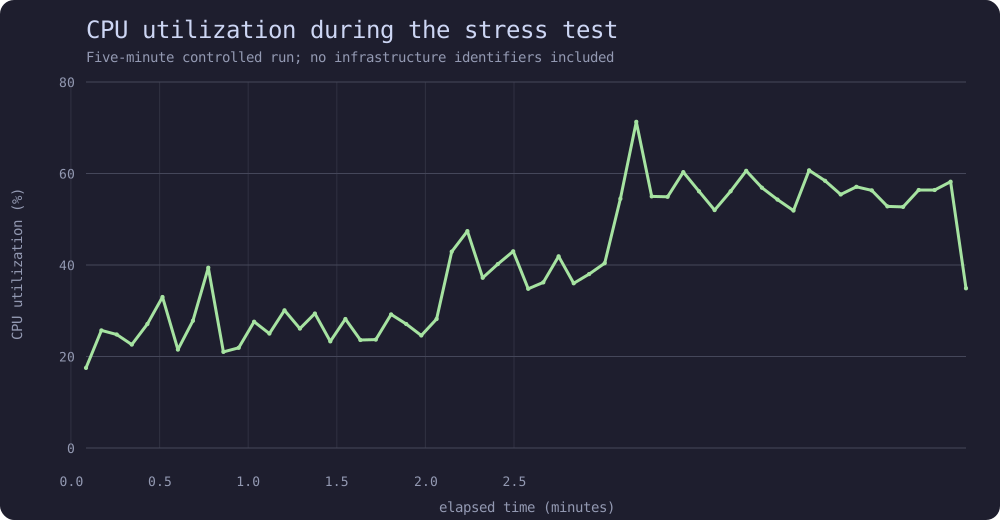
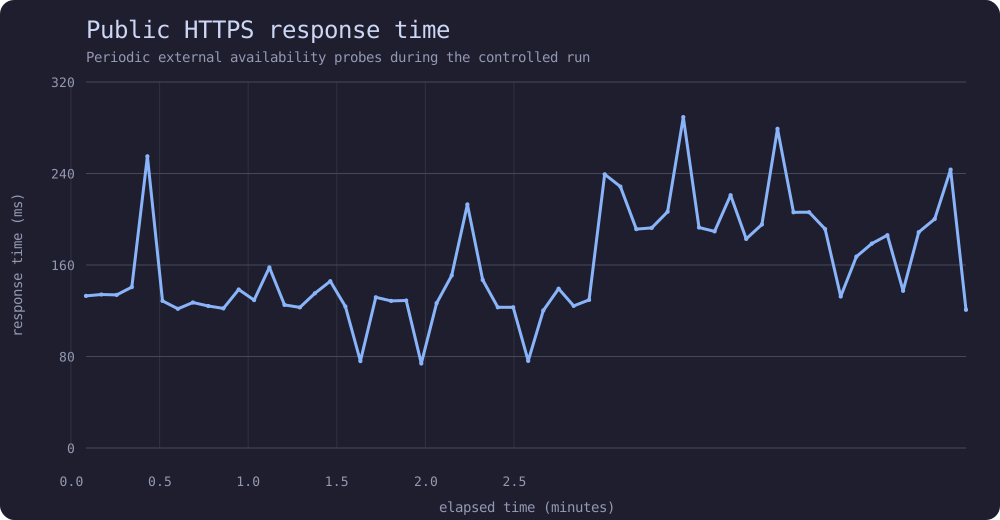
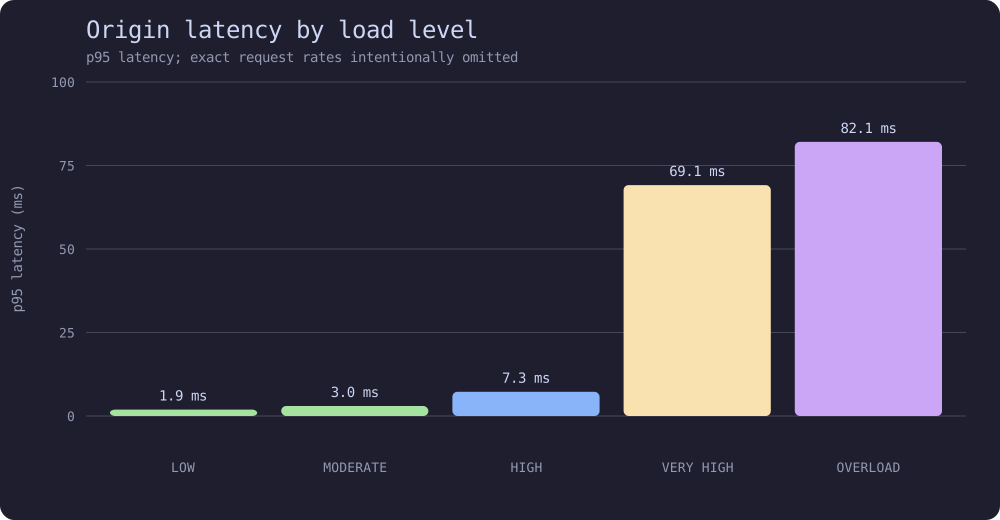
The graphs above are sanitized public versions generated from the original telemetry. Raw logs, exact load targets, connection counts, memory-management details, host identifiers and operational thresholds remain private.
privacy is part of the build
A public technical blog can accidentally become an attack-surface inventory. TenArchive deliberately avoids publishing server addresses beyond what is needed to reach the site, internal hostnames, private network layouts, administrative endpoints, credentials, exact exposure rules or recovery details. Public project pages explain decisions and architecture at a useful level without documenting how to attack the host.
The same rule applies to personal information. The site is about projects and interests, not about publishing a real-world identity.
what I learned
A tiny machine forced better decisions: fewer dependencies, smaller assets, less JavaScript and a clearer distinction between content and interface. The design also improved once I stopped treating “terminal style” as a collection of visual effects and started treating it as a writing and navigation language.
TenArchive is still intentionally unfinished. The archive can grow one page at a time without requiring a rebuild pipeline, a database migration or a new service.
references / useful reading
This post intentionally omits operational details that would make the public site a useful map of its own infrastructure.